ZArchiver APK – The Ultimate File Manager and Archive Tool for Android
1.0.10

📦 ZArchiver APK 1.0.10 – The Ultimate File Manager and Archive Tool for Android In the world of Android devices, managing files efficiently is essential. Whether it’s compressing large files, extracting ZIP and RAR archives, or organizing your storage, having a powerful file management tool makes a huge difference. One app that stands out for its simplicity, power, and versatility is ZArchiver. The latest version, ZArchiver APK 1.0.10, continues to be a go-to solution for millions of Android users who want full control over their files. It’s lightweight, easy to use, and packed with features that make handling compressed files a breeze. In this blog, we’ll explore everything you need to know about ZArchiver 1.0.10, from its features and benefits to how to download and use it effectively. 📁 What is ZArchiver? ZArchiver is a free and powerful file management and compression tool for Android that allows you to create, extract, and manage a variety of archive file formats. Developed by ZDevs, it’s designed to help users handle all kinds of compressed files — ZIP, RAR, 7Z, TAR, ISO, and many more — directly from their smartphones or tablets. What sets ZArchiver apart is its clean and intuitive interface, which makes it accessible even for beginners. Whether you want to extract a game OBB file, compress large media into smaller archives, or password-protect sensitive files, ZArchiver does it all without the need for a PC. ⚙️ ZArchiver APK 1.0.10 – Overview 📱 App Name: ZArchiver 🧰 Version: 1.0.10 🧑‍💻 Developer: ZDevs 💾 File Size: ~4 MB 📱 Platform: Android 5.0+ 📦 Category: Tools / File Management 🆓 License: Free The small size and efficient performance make ZArchiver ideal even for devices with limited storage and memory. Despite its lightweight nature, it delivers professional-level performance for handling archives and compressed files. 🚀 Key Features of ZArchiver APK 1.0.10 ZArchiver is much more than just a ZIP extractor. Here are the standout features that make it one of the most popular file manager apps for Android: 1. 📦 Create and Extract Multiple Archive Formats ZArchiver supports almost every major compression format, including: ZIP, 7Z, RAR, TAR, ISO, GZIP, BZIP2 – for creating archives. ZIP, 7Z, RAR, ISO, TAR.GZ, LZH, ARJ, XZ – for extracting archives. You can even create multi-part archives, split large files, or merge them with ease. 2. 🔐 Password-Protected Archives Security is a key concern when handling sensitive data. ZArchiver allows you to create password-protected archives, ensuring your private files remain safe and accessible only to you. 3. 📁 Browse and Manage Files Easily ZArchiver doubles as a powerful file manager. You can: Copy, cut, paste, rename, and delete files. Create new folders and organize files into directories. Access both internal and external (SD card) storage. Its intuitive layout makes navigating through files quick and hassle-free. 4. 📤 Extract Files Without Decompression One of ZArchiver’s unique features is the ability to view and extract specific files from within an archive without decompressing the entire file. This saves time and storage space, especially when dealing with large archives. 5. 📲 Work with Large Files Unlike many other archive managers that struggle with large files, ZArchiver handles big archives smoothly. You can extract or compress files that are several gigabytes in size without performance issues. 6. 🧰 Support for UTF-8/UTF-16 Encoding If you work with files containing special characters or different languages, ZArchiver supports UTF-8 and UTF-16 encoding, ensuring file names are displayed correctly across languages. 7. ⚡ Fast and Lightweight Performance Despite its powerful capabilities, ZArchiver is extremely fast and efficient. It uses minimal system resources, so you won’t experience lags or slowdowns even when handling multiple archives. 🧠 Benefits of Using ZArchiver APK 1.0.10 Here’s why millions of Android users prefer ZArchiver over other file management apps: 🛠️ All-in-one archive solution – no need for multiple apps. 🔐 Enhanced security with password protection. 📂 Efficient file management – organize, rename, and move files easily. ⚡ Time-saving – extract only what you need without full decompression. 📶 No internet required – works completely offline. 📱 Simple and intuitive interface – beginner-friendly yet powerful. 📥 How to Download and Install ZArchiver APK 1.0.10 If ZArchiver is not available on your Play Store or you want the latest version directly, you can install it using the APK file. Here’s how: 📲 Step-by-Step Installation Guide Step 1: Download the ZArchiver APK 1.0.10 from a trusted source. Step 2: On your Android device, go to Settings > Security > Install unknown apps. Step 3: Enable the option to allow installation from your browser or file manager. Step 4: Locate the downloaded file in your Downloads folder. Step 5: Tap the APK file and select Install. Step 6: Once installed, open the app and start managing your archives immediately. ✅ Done! You’re now ready to enjoy all the powerful features of ZArchiver. 🧰 How to Use ZArchiver – Quick Guide Here’s a quick overview of how to use ZArchiver for different tasks: 📦 Create an Archive Open ZArchiver. Navigate to the files or folders you want to compress. Long-press to select them. Tap the “Compress” option and choose a format (ZIP, 7Z, etc.). (Optional) Set a password for extra security. Tap OK — your archive is ready. 📂 Extract Files Locate the archive you want to extract. Tap it and select “Extract here” or “Extract to…” to choose a folder. Wait a few seconds — your files are now accessible. 🔐 Create a Password-Protected Archive Select files and choose “Compress.” Enter a strong password when prompted. Your archive is now encrypted and secure. 📁 View Files Without Extracting Tap any archive. Browse inside without extracting the entire file. Long-press any file and select “Extract” if you only need that specific one. 🆚 ZArchiver vs. Other File Management Apps Feature ZArchiver WinZip RAR File Format Support ✅ Extensive ✅ Limited ✅ Good Password Protection ✅ Yes ✅ Yes ✅ Yes Partial Extraction ✅ Yes ❌ No ✅ Yes File Manager Features ✅ Yes ❌ Basic ❌ Basic Performance ⚡ Fast & Lightweight ⚠️ Slower ⚠️ Moderate ZArchiver clearly outperforms many of its competitors in terms of features, versatility, and ease of use. 🛡️ Is ZArchiver Safe? Yes, ZArchiver is completely safe when downloaded from a reliable source. It does not require unnecessary permissions or access to sensitive data. The app works entirely offline, further minimizing privacy risks. Just make sure you download the APK from a trusted website to avoid modified or malicious versions. 🏁 Final Thoughts – Why ZArchiver 1.0.10 is a Must-Have If you frequently deal with compressed files or want more control over your phone’s storage, ZArchiver APK 1.0.10 is a must-have tool. Its balance of simplicity, power, and versatility makes it perfect for both beginners and advanced users. From creating and extracting archives to password-protecting sensitive files and managing large data, ZArchiver handles it all with ease. The fact that it’s lightweight, offline, and free makes it even more appealing. Whether you’re organizing game files, sharing compressed data, or just decluttering your device, ZArchiver – File Manager & Archive Tool is the all-in-one solution you’ve been looking for. ✅ Download ZArchiver APK 1.0.10 today and unlock the full potential of your Android device — manage, compress, extract, and secure your files effortlessly.
DownloadTELEGRAM
4.8/5 Votes: 23,000
Updated
Jun 29, 2024
Size
5MB
Version
1.0.10
Downloads
100K+
Report this app

Description

Introduction

In the world of Android devices, managing files efficiently is essential. Whether it’s compressing large files, extracting ZIP and RAR archives, or organizing your storage, having a powerful file management tool makes a huge difference. One app that stands out for its simplicity, power, and versatility is ZArchiver.

The latest version, ZArchiver APK 1.0.10, continues to be a go-to solution for millions of Android users who want full control over their files. It’s lightweight, easy to use, and packed with features that make handling compressed files a breeze. In this blog, we’ll explore everything you need to know about ZArchiver 1.0.10, from its features and benefits to how to download and use it effectively.


📁 What is ZArchiver?

ZArchiver is a free and powerful file management and compression tool for Android that allows you to create, extract, and manage a variety of archive file formats. Developed by ZDevs, it’s designed to help users handle all kinds of compressed files — ZIP, RAR, 7Z, TAR, ISO, and many more — directly from their smartphones or tablets.

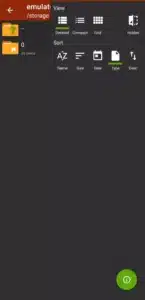
What sets ZArchiver apart is its clean and intuitive interface, which makes it accessible even for beginners. Whether you want to extract a game OBB file, compress large media into smaller archives, or password-protect sensitive files, ZArchiver does it all without the need for a PC.


⚙️ ZArchiver APK 1.0.10 – Overview

  • 📱 App Name: ZArchiver
  • 🧰 Version: 1.0.10
  • 🧑‍💻 Developer: ZDevs
  • 💾 File Size: ~4 MB
  • 📱 Platform: Android 5.0+
  • 📦 Category: Tools / File Management
  • 🆓 License: Free

The small size and efficient performance make ZArchiver ideal even for devices with limited storage and memory. Despite its lightweight nature, it delivers professional-level performance for handling archives and compressed files.


🚀 Key Features of ZArchiver APK 1.0.10

ZArchiver is much more than just a ZIP extractor. Here are the standout features that make it one of the most popular file manager apps for Android:


1. 📦 Create and Extract Multiple Archive Formats

ZArchiver supports almost every major compression format, including:

  • ZIP, 7Z, RAR, TAR, ISO, GZIP, BZIP2 – for creating archives.
  • ZIP, 7Z, RAR, ISO, TAR.GZ, LZH, ARJ, XZ – for extracting archives.

You can even create multi-part archives, split large files, or merge them with ease.


2. 🔐 Password-Protected Archives

Security is a key concern when handling sensitive data. ZArchiver allows you to create password-protected archives, ensuring your private files remain safe and accessible only to you.


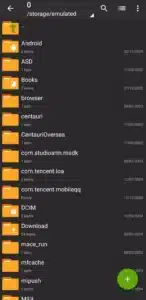
3. 📁 Browse and Manage Files Easily

ZArchiver doubles as a powerful file manager. You can:

  • Copy, cut, paste, rename, and delete files.
  • Create new folders and organize files into directories.
  • Access both internal and external (SD card) storage.

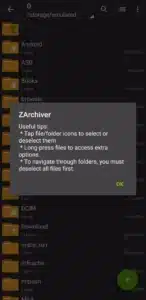
Its intuitive layout makes navigating through files quick and hassle-free.


4. 📤 Extract Files Without Decompression

One of ZArchiver’s unique features is the ability to view and extract specific files from within an archive without decompressing the entire file. This saves time and storage space, especially when dealing with large archives.


5. 📲 Work with Large Files

Unlike many other archive managers that struggle with large files, ZArchiver handles big archives smoothly. You can extract or compress files that are several gigabytes in size without performance issues.


6. 🧰 Support for UTF-8/UTF-16 Encoding

If you work with files containing special characters or different languages, ZArchiver supports UTF-8 and UTF-16 encoding, ensuring file names are displayed correctly across languages.


7. ⚡ Fast and Lightweight Performance

Despite its powerful capabilities, ZArchiver is extremely fast and efficient. It uses minimal system resources, so you won’t experience lags or slowdowns even when handling multiple archives.


🧠 Benefits of Using ZArchiver APK 1.0.10

Here’s why millions of Android users prefer ZArchiver over other file management apps:

  • 🛠️ All-in-one archive solution – no need for multiple apps.
  • 🔐 Enhanced security with password protection.
  • 📂 Efficient file management – organize, rename, and move files easily.
  • ⚡ Time-saving – extract only what you need without full decompression.
  • 📶 No internet required – works completely offline.
  • 📱 Simple and intuitive interface – beginner-friendly yet powerful.

📥 How to Download and Install ZArchiver APK 1.0.10

If ZArchiver is not available on your Play Store or you want the latest version directly, you can install it using the APK file. Here’s how:


📲 Step-by-Step Installation Guide

Step 1: Download the ZArchiver APK 1.0.10 from a trusted source.
Step 2: On your Android device, go to Settings > Security > Install unknown apps.
Step 3: Enable the option to allow installation from your browser or file manager.
Step 4: Locate the downloaded file in your Downloads folder.
Step 5: Tap the APK file and select Install.
Step 6: Once installed, open the app and start managing your archives immediately.

✅ Done! You’re now ready to enjoy all the powerful features of ZArchiver.


🧰 How to Use ZArchiver – Quick Guide

Here’s a quick overview of how to use ZArchiver for different tasks:


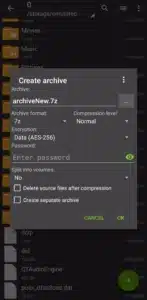
📦 Create an Archive

  1. Open ZArchiver.
  2. Navigate to the files or folders you want to compress.
  3. Long-press to select them.
  4. Tap the “Compress” option and choose a format (ZIP, 7Z, etc.).
  5. (Optional) Set a password for extra security.
  6. Tap OK — your archive is ready.

📂 Extract Files

  1. Locate the archive you want to extract.
  2. Tap it and select “Extract here” or “Extract to…” to choose a folder.
  3. Wait a few seconds — your files are now accessible.

🔐 Create a Password-Protected Archive

  1. Select files and choose “Compress.”
  2. Enter a strong password when prompted.
  3. Your archive is now encrypted and secure.

📁 View Files Without Extracting

  1. Tap any archive.
  2. Browse inside without extracting the entire file.
  3. Long-press any file and select “Extract” if you only need that specific one.

🆚 ZArchiver vs. Other File Management Apps

FeatureZArchiverWinZipRAR
File Format Support✅ Extensive✅ Limited✅ Good
Password Protection✅ Yes✅ Yes✅ Yes
Partial Extraction✅ Yes❌ No✅ Yes
File Manager Features✅ Yes❌ Basic❌ Basic
Performance⚡ Fast & Lightweight⚠️ Slower⚠️ Moderate

ZArchiver clearly outperforms many of its competitors in terms of features, versatility, and ease of use.


🛡️ Is ZArchiver Safe?

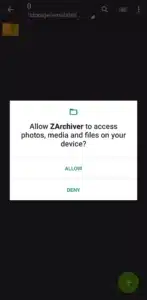
Yes, ZArchiver is completely safe when downloaded from a reliable source. It does not require unnecessary permissions or access to sensitive data. The app works entirely offline, further minimizing privacy risks. Just make sure you download the APK from a trusted website to avoid modified or malicious versions.


🏁 Final Thoughts – Why ZArchiver 1.0.10 is a Must-Have

If you frequently deal with compressed files or want more control over your phone’s storage, ZArchiver APK 1.0.10 is a must-have tool. Its balance of simplicity, power, and versatility makes it perfect for both beginners and advanced users.

From creating and extracting archives to password-protecting sensitive files and managing large data, ZArchiver handles it all with ease. The fact that it’s lightweight, offline, and free makes it even more appealing.

Whether you’re organizing game files, sharing compressed data, or just decluttering your device, ZArchiver – File Manager & Archive Tool is the all-in-one solution you’ve been looking for.


✅ Download ZArchiver APK 1.0.10 today and unlock the full potential of your Android device — manage, compress, extract, and secure your files effortlessly.

Images

Download links

How to install ZArchiver APK 1.0.10 – The Ultimate File Manager and Archive Tool for Android APK?

1.⁠ ⁠Tap the downloaded ZArchiver APK 1.0.10 – The Ultimate File Manager and Archive Tool for Android APK file.

2.⁠ ⁠Touch install.

3.⁠ ⁠Follow the steps on the screen.

Leave a Reply

Your email address will not be published. Required fields are marked *

Facebook comments