The global labor landscape in 2026 has undergone a permanent structural transformation. Traditional 9-to-5 office routines have given way to dynamic, borderless remote work ecosystems. Businesses—ranging from ambitious tech startups to Fortune 500 enterprises—no longer limit their talent searches to local geographic radiuses. Instead, they leverage digital marketplaces to connect with specialized professionals worldwide.
The global labor landscape in 2026 has undergone a permanent structural transformation. Traditional 9-to-5 office routines have given way to dynamic, borderless remote work ecosystems. Businesses—ranging from ambitious tech startups to Fortune 500 enterprises—no longer limit their talent searches to local geographic radiuses. Instead, they leverage digital marketplaces to connect with specialized professionals worldwide.
At the center of this remote work revolution is Upwork, universally recognized as the world’s largest and most sophisticated freelancing platform. Managing billions of dollars in annual contract volume across hundreds of skill categories, Upwork serves as the ultimate bridge connecting independent talent with lucrative client opportunities.
Whether you are an independent freelancer looking to launch a full-time digital career, an experienced agency owner expanding your client roster, or a business owner seeking top-tier international talent, understanding how to navigate Upwork effectively is essential.
In this ultimate 2026 guide, we will explore every single dimension of Upwork: from setting up an elite profile via the Upwork Platform Portal to mastering proposal writing, understanding the Connects system, navigating client escrow protections, utilizing mobile productivity tools, and scaling your earnings into a thriving business.
Table of Contents
What is Upwork and Why is it the Market Leader?
Upwork was formed through the historic merger of Elance and oDesk, two pioneering platforms in the early gig economy. Today, it stands as the undisputed titan of online talent acquisition.
Unlike niche job boards or micro-task sites, Upwork offers a comprehensive ecosystem designed for high-value professional services. The platform accommodates virtually every knowledge-work discipline, including software development, artificial intelligence engineering, UI/UX design, digital marketing, technical writing, video production, accounting, and legal consulting.
========================================================================
                   UPWORK PLATFORM SNAPSHOT (2026)
========================================================================
Platform Type        : Global Freelance Marketplace & Talent Network
Contract Models      : Hourly Rate, Fixed-Price Escrow, Consultations
Target Audience      : Independent Freelancers, Agencies, SMBs, Enterprise
Core Industries      : Web Dev, Mobile Apps, AI/ML, Design, Marketing, Copy
Official Portal Link : https://www.talkable.com/x/pe1mux
Productivity Partner : https://www.redapk.net
========================================================================
Why Upwork Outperforms Competitors:
Global Enterprise Reach: Access verified clients ranging from small business owners to global corporations like Microsoft, Airbnb, and Nasdaq.
Guaranteed Payment Protection: Rest easy knowing your work is backed by Upwork Hourly Payment Protection and Fixed-Price Escrow.
Flexible Engagement Models: Choose between hourly contracts, milestone-based fixed projects, direct consultations, or pre-packaged services via the Project Catalog.
Specialized Profiles: Showcase distinct skill sets (e.g., Full-Stack Web Development vs. Mobile App UI Design) under a single master account.
Integrated Workspace Tools: Built-in messaging, high-definition video calling, work diaries, time tracking, and automated invoicing.
For remote professionals looking to optimize their mobile work setups with productivity utilities, time management tools, and business software, check out RedAPK, a premier digital repository for mobile applications.
The Contract Models: How Work Gets Done on Upwork
One of Upwork’s greatest strengths is its flexibility in contract structuring. The platform supports four main engagement types tailored to different project scopes:
Upwork Guide 2026: Master the World’s Largest Freelancing Platform & Scale Your Career
Hourly contracts offer real-time flexibility. Freelancers use the official Upwork Desktop App to log hours, record activity levels, and automatically capture memo-annotated desktop screenshots.
Payment Protection: As long as hours are tracked using the desktop app with active work memos, Upwork guarantees payment even if the client’s funding account fails.
2. Fixed-Price Contracts
Fixed-price contracts are organized around defined deliverables and milestones.
Escrow Protection: Before you begin working on a milestone, the client must fund the escrow account for that specific amount. Once you submit the completed deliverable, the client reviews it and releases the escrowed funds directly to your wallet.
3. Project Catalog
Think of the Project Catalog as Upwork’s e-commerce store for freelancing services. Freelancers create pre-defined service packages (e.g., “I will build a custom Shopify store in 5 days for $500”). Clients can browse, purchase, and submit requirements instantly without posting a job or conducting interviews.
4. Consultations
High-level experts can sell 30-minute or 60-minute strategy sessions. Clients book open slots on your calendar, submit their background questions, and join a 1-on-1 video conference to receive tailored professional guidance.
How to Create an Elite Freelancer Profile on Upwork
Your profile is your digital storefront. On a platform with millions of active freelancers, a generic or incomplete profile will be overlooked. To land high-paying contracts, your profile must instantly communicate authority, specialized expertise, and clear client value.
Upwork Guide 2026: Master the World’s Largest Freelancing Platform & Scale Your Career
+--------------------------------------------------------------------------+
|                     PROFILE OPTIMIZATION CHECKLIST                       |
+--------------------------------------------------------------------------+
| 1. High-Resolution Professional Headshot (Friendly, clean background)    |
| 2. Highly Specific Profile Title (e.g., "Senior React Native Engineer")  |
| 3. Client-Centric Overview Video (30 to 60 seconds intro)                |
| 4. Value-Driven Bio (Focus on outcomes, ROI, and client problem-solving) |
| 5. Curated Portfolio Items (Detailed case studies with visual proof)     |
| 6. Verified Skills & Certifications                                      |
| 7. Specialized Profiles Created for Niche Categories                     |
+--------------------------------------------------------------------------+
Step-by-Step Profile Optimization Blueprint:
Craft a Client-Centric Title: Avoid broad titles like “Expert Developer.” Instead, use targeted keywords: “Full-Stack Python & Django Developer | SaaS Architecture Specialist.”
Structure Your Bio Overview Effectively: Structure your overview using this simple formula:
The Hook: State who you help and the exact results you deliver in the first 2 lines.
Core Competencies: Bullet points detailing your technical toolstack and capabilities.
Social Proof & Case Studies: Highlight past client successes, statistics, and revenue generated for clients.
Call to Action (CTA): End with a clear invitation: “Click ‘Invite to Job’ or book a consultation to discuss your project!”
Build Visual Case Studies in Your Portfolio: Don’t just upload screenshots. For every portfolio item, detail the Problem, your Solution, and the final Business Impact (e.g., “Redesigned checkout flow, increasing mobile conversion rates by 34%”).
Add Specialized Profiles: Upwork allows you to publish two specialized profiles alongside your general profile. If you offer both WordPress Development and SEO Content Strategy, create separate specialized profiles for each so clients see only relevant skills and work history.
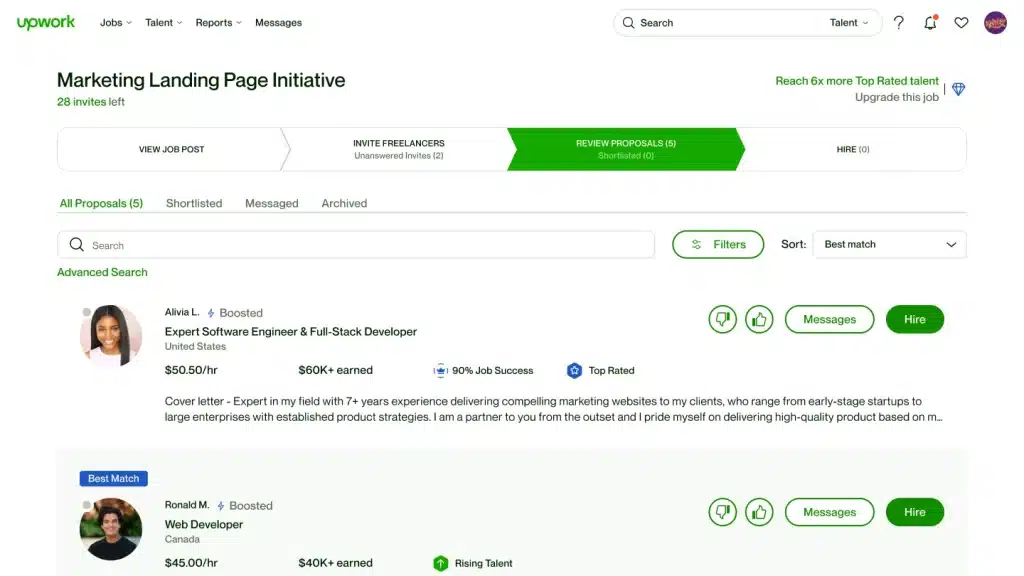
To apply for jobs on Upwork’s Talent Marketplace, freelancers submit proposals using Connects—the platform’s virtual token currency.
Understanding the Connects System
Job postings require anywhere from 2 to 16+ Connects depending on the project’s budget, duration, and demand. Connects serve two vital purposes:
They prevent spam by requiring freelancers to be intentional with their applications.
They allow top freelancers to Boost their proposals to appear in the top 3 slots on a client’s applicant list.
The Winning Proposal Framework
Clients often receive dozens of proposals within hours of posting a job. The first 2 lines of your cover letter are visible in the client’s preview list before they open your full proposal. If those initial lines don’t grab attention, your proposal will be ignored.
+--------------------------------------------------------------------------+
|                    THE 4-PART HIGH-CONVERTING PROPOSAL                   |
+--------------------------------------------------------------------------+
| Part 1: The Hook       | Address the specific problem mentioned in the job|
| Part 2: Quick Proof    | Share a relevant case study or sample link       |
| Part 3: Action Plan    | Outline 2-3 immediate steps you will take        |
| Part 4: Smart Question | End with a low-friction question to start chat   |
+--------------------------------------------------------------------------+
Example Proposal Template:
“Hi [Client Name],
I saw you’re looking to reduce your web app’s bounce rate and fix slow LCP performance scores on mobile. I recently optimized a similar Next.js store, dropping load time from 4.2s to 0.9s and boosting sales conversions by 22%.
Here is a direct link to that live case study: [Link]
For your project, my immediate strategy would be: 1. Audit and compress unoptimized image assets. 2. Implement server-side caching and dynamic code splitting. 3. Clean up blocking third-party scripts.
Are you available for a quick 5-minute chat on Upwork Messages to discuss your current core web vitals setup?
Upwork Guide 2026: Master the World’s Largest Freelancing Platform & Scale Your Career
To help top talent stand out, Upwork implements a performance metric called the Job Success Score (JSS) along with prestigious talent badges.
+-------------------+------------------------------------------------------+
| BADGE / METRIC    | ELIGIBILITY REQUIREMENTS                             |
+-------------------+------------------------------------------------------+
| Job Success Score | Calculated metric (0-100%) based on public/private |
| (JSS)             | client feedback over 6, 12, and 24-month windows.    |
+-------------------+------------------------------------------------------+
| Rising Talent     | New freelancers with great profiles, early contract  |
|                   | success, and active proposals (No JSS required).    |
+-------------------+------------------------------------------------------+
| Top Rated         | 90%+ JSS, $1k+ earnings in 12 months, 100% complete  |
|                   | profile, no recent account holds.                    |
+-------------------+------------------------------------------------------+
| Top Rated Plus    | Meets Top Rated criteria PLUS worked on high-value   |
|                   | contracts ($10k+ single enterprise or large projects)|
+-------------------+------------------------------------------------------+
| Expert Vetted     | Manually vetted by Upwork talent managers (Top 1%    |
|                   | of technical and creative talent globally).          |
+-------------------+------------------------------------------------------+
Why JSS & Badges Matter:
Higher Search Visibility: Top Rated and Top Rated Plus freelancers rank significantly higher in client search results.
Reduced Service Fees: Top Rated freelancers enjoy perks like Job Success Score protection (ability to remove 1 bad feedback score every 3 months or 10 contracts).
Exclusive Client Invitations: Premium enterprise clients often set their job filters to accept proposals exclusively from Top Rated or Expert Vetted talent.
For additional tech tools, productivity APKs, and mobile utilities that help manage your freelance business, explore RedAPK Apps Hub.
Hiring Top Talent on Upwork: Guide for Businesses & Employers
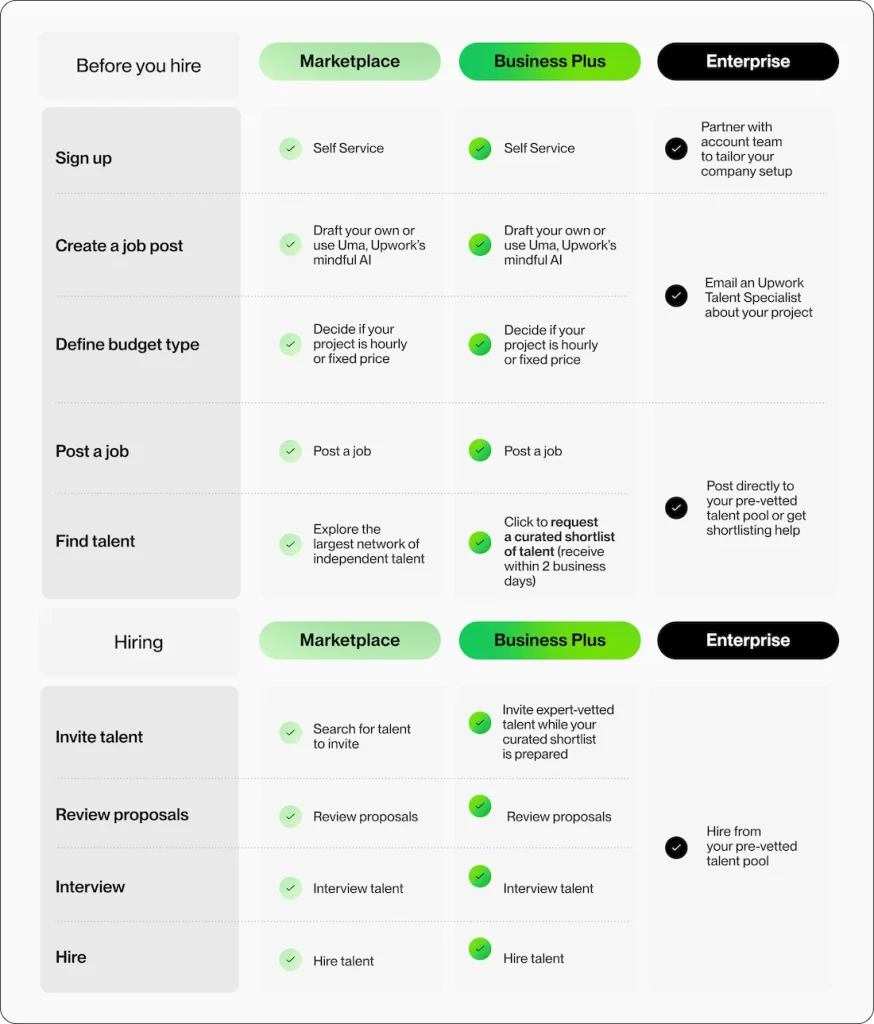
Upwork is not just for freelancers—it is an incredible engine for business owners, startup founders, and enterprise managers looking to scale their operations quickly.
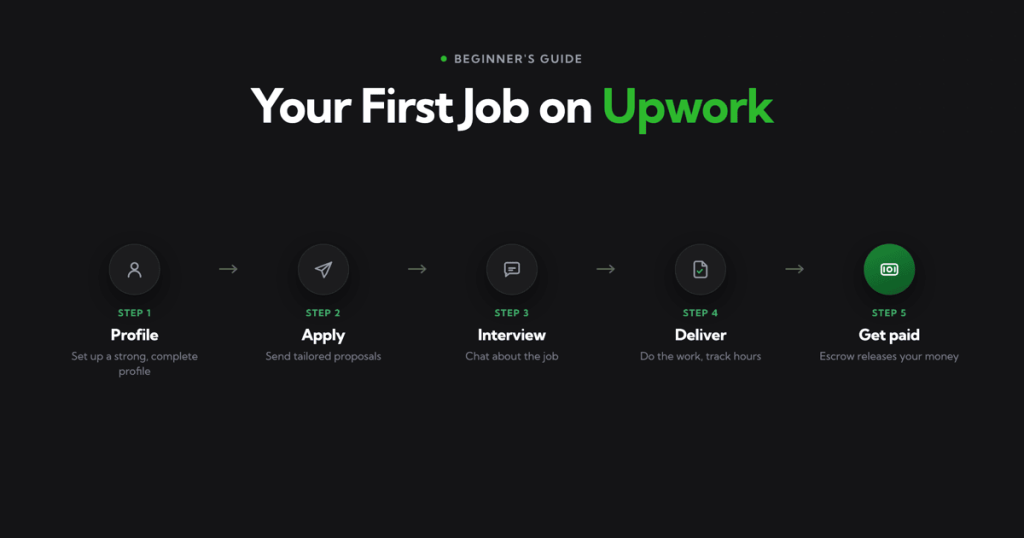
+--------------------------------------------------------------------------+
|                     CLIENT HIRING WORKFLOW ON UPWORK                     |
+--------------------------------------------------------------------------+
| Step 1: Post a Detailed Job (Define scope, deliverables, and budget)     |
| Step 2: Filter Applicants (Review JSS, portfolios, and cover letters)    |
| Step 3: Conduct Video Interviews (Use Upwork's integrated Zoom tool)     |
| Step 4: Hire & Fund Escrow (Keep transactions inside the platform)       |
| Step 5: Review & Release Payment (Approve milestones upon satisfaction)  |
+--------------------------------------------------------------------------+
Tips for Hiring the Best Talent:
Write Clear, Specific Job Posts: Instead of asking for “A WordPress Expert,” write “Need a WordPress Developer to Fix WooCommerce Checkout Bugs and API Gateway Sync.”
Include a Screening Question: Add a simple question in your job post (e.g., “Start your proposal with the word ‘Blue'”) to immediately weed out automated bot submissions.
Look at Private Feedback Trends: Check the freelancer’s past work history, job success score, and client reviews before extending an offer.
Use Upwork Enterprise for Large Teams: Enterprise accounts provide custom compliance reviews, dedicated talent matching, and consolidated invoicing for corporate teams.
To maintain its secure marketplace, payment protection guarantees, and dispute arbitration services, Upwork charges service fees on contract earnings.
Upwork Service Fee Structure
Upwork operates a simplified 10% flat service fee on all freelance earnings across all contracts.
For example, if you bill $1,000 on a contract, Upwork’s fee is $100, leaving you with $900 net earnings.
+--------------------------------------------------------------------------+
|                         SUPPORTED WITHDRAWAL METHODS                     |
+--------------------------------------------------------------------------+
| Direct Local Bank Transfer (Local currency payout, low transaction cost) |
| Payoneer (Fast USD transfers to Payoneer Mastercard or bank)            |
| PayPal (Instant digital wallet transfer)                                 |
| Wire Transfer ($50 USD fee per wire, best for large lump sums)          |
| Direct to U.S. Bank (ACH) (Free transfer for U.S. account holders)       |
+--------------------------------------------------------------------------+
Most In-Demand Skills on Upwork in 2026
The demand for specialized digital skills continues to grow. Here are the top skill categories experiencing high client demand and rising hourly rates on Upwork:
1. Artificial Intelligence & Machine Learning
Prompt engineering, LLM fine-tuning, OpenAI API integration, LangChain development, and AI agent automation.
Figma prototyping, design systems, mobile app interface design, user research, and interactive wireframing.
4. Digital Marketing & Growth Hacking
Performance marketing (Google/Meta ads), SEO strategy, conversion rate optimization (CRO), and email automation.
5. Content Creation & Copywriting
Technical documentation, SEO-optimized long-form content, video scripting, and high-converting sales copy.
For freelancers working in mobile development, design, or content creation who need verified mobile software mirrors, check out RedAPK Mobile Productivity.
Essential Mobile & Productivity Apps for Upwork Freelancers
Running a successful freelance business requires managing communications, tracking deliverables, and monitoring job feeds on the go. Having the right mobile tools installed keeps you responsive to client inquiries.
To ensure your Android smartphone is equipped with the latest verified productivity tools, utility mods, and business tools, explore the software catalog at RedAPK Software Portal.
Scaling from Solo Freelancer to an Upwork Agency
Once your individual schedule is booked solid and your hourly rate reaches top market tiers, the natural next step is to scale your business by launching an Upwork Agency.
+--------------------------------------------------------------------------+
|                     SOLO FREELANCER VS. UPWORK AGENCY                    |
+--------------------------------------------------------------------------+
| Solo Freelancer  : Trades personal time for money (Capped income potential)|
| Upwork Agency    : Leverages a team of sub-freelancers under 1 agency flag|
+--------------------------------------------------------------------------+
Steps to Build a Successful Upwork Agency:
Create an Agency Account: Upgrade your account inside settings to create an Agency Profile linked to your main account.
Recruit Specialist Team Members: Add junior developers, designers, copywriters, or virtual assistants to your agency roster.
Submit Proposals as an Agency: Submit agency proposals to larger projects. The client hires your agency, and you assign specific agency team members to execute the work while you manage quality control and client communications.
Increase Average Contract Values: Agencies can pitch comprehensive turnkey solutions (e.g., a $20,000 full-scope software build) that solo freelancers cannot handle alone.
To protect your account from warnings or permanent suspension, adhere strictly to Upwork’s Terms of Service:
1. Keep All Communications & Payments Inside Upwork
Never accept payments outside Upwork for clients met on the platform. Doing so violates platform policies and forfeits your Hourly and Escrow Payment Protection.
2. Never Pay to Apply for a Job (Outside Connects)
Clients are strictly forbidden from asking freelancers for upfront registration fees, security deposits, or buying equipment from unverified vendors.
3. Maintain Prompt, Professional Communication
Always respond to client messages within 24 hours. Prompt communication is one of the biggest factors in receiving 5-star private feedback and maintaining a 90%+ JSS.
Technical Troubleshooting & FAQ
Here are answers to the most common questions asked by new freelancers and clients joining Upwork:
Frequently Asked Questions (FAQs)
Q1: Is Upwork free to join?
Yes! Creating a basic freelancer or client account is 100% free. Freelancers receive a starter allotment of Connects upon profile approval, with option to buy additional Connects as needed. Register via Start Freelancing on Upwork.
Q2: How long does it take to get paid on Upwork?
For hourly contracts, billing cycles run Monday through Sunday. Funds enter a 5-day security hold before becoming available for withdrawal the following Wednesday. For fixed-price contracts, funds are released as soon as the client approves the milestone.
Q3: Can I work on Upwork using only my mobile phone?
While you can browse jobs, chat with clients, and submit proposals using the Upwork mobile app, logging hourly contracts requires the desktop app. Design, coding, and writing work generally require a computer setup.
Q4: How do I improve a low Job Success Score (JSS)?
Complete current contracts successfully, request feedback from happy long-term clients, and close old inactive open contracts that may be weighing down your score.
Q5: Where can I download verified mobile productivity apps?
You can download verified business and utility applications from RedAPK Download Hub.
Conclusion & Final Action Plan
Upwork is far more than a simple job board—it is an engine for career freedom and business growth. By offering guaranteed payment protections, access to top global clients, flexible contract structures, and robust agency scaling options, Upwork provides everything required to build a high-earning remote career.
Whether your goal is to earn extra income side-hustling on weekends or to scale a 6-figure global consulting agency, success comes down to profile positioning, proposal quality, and delivering outstanding results.
Ready to take control of your professional career?
For more tech app reviews, mobile productivity tools, and software downloads, don’t forget to visit RedAPK Official Site!
Disclaimer: Remote freelancing involves dedication, skill continuous learning, and professional self-management. Success on Upwork depends on profile quality, proposal strategy, and client satisfaction. Please review Upwork’s official Terms of Service to ensure compliance.