
The global employment dynamic in 2026 has reached a definitive turning point. The traditional paradigm of location-bound 9-to-5 corporate jobs has been replaced by an agile, borderless online talent economy. Modern companies—ranging from disruptive tech startups to established multinational brands—frequently choose not to restrict their hiring within local geographic borders. Instead, they source specialized skill sets dynamically through online workforce platforms.
Positioned at the absolute peak of this digital transformation is Upwork, universally recognized as the world’s premier freelancing network. Facilitating billions of dollars in annual commerce across hundreds of professional disciplines, Upwork acts as an essential infrastructure connecting independent specialists with lucrative international projects.
Whether you are an ambitious professional striving to launch a full-time remote consulting career, an agency founder expanding your corporate roster, or a business manager looking to recruit world-class talent, mastering Upwork is one of the most valuable investments you can make in 2026.
In this completely updated, comprehensive handbook, we will dissect every core element of the network: from launching a high-converting profile via the Upwork Official Platform to writing winning proposals, utilizing Connects effectively, leveraging payment protection guarantees, installing mobile productivity applications, and expanding a solo gig into a profitable agency.
Table of Contents
Understanding Upwork: Platform Mechanics & Ecosystem
Formed through the merger of industry pioneers Elance and oDesk, Upwork has evolved into a sophisticated enterprise marketplace for remote professional services.
Unlike basic gig directories or low-cost micro-task boards, Upwork is engineered specifically to support high-value, long-term professional relationships. The marketplace spans dozens of primary skill domains, including software engineering, artificial intelligence development, graphic design, growth marketing, technical copywriting, financial modeling, and administrative support.
========================================================================
                    UPWORK PLATFORM ECOSYSTEM (2026)
========================================================================
Platform Type        : Global Remote Work Marketplace & Agency Network
Engagement Types     : Hourly Contracts, Escrow Milestones, Catalog Services
Target Audience      : Independent Freelancers, Agencies, SMBs, Enterprise
Core Skill Sectors   : Web/Mobile Dev, AI/ML, Design, Marketing, Finance
Official Sign-Up Link: https://www.talkable.com/x/pe1mux
Software Resource    : https://www.redapk.net
========================================================================
Core Advantages of Upwork in 2026:
- Unrivaled Client Base: Connect directly with verified business clients, including Silicon Valley startups and Fortune 500 corporations.
- Financial Protection Guarantees: Work with complete peace of mind through Upwork Hourly Payment Protection and Fixed-Price Escrow deposits.
- Versatile Engagement Channels: Operate via hourly tracking, milestone-based projects, consultation bookings, or pre-packaged services in the Project Catalog.
- Specialized Profile Customization: Showcase different technical skill sets (e.g., Python Backend Architecture vs. Frontend React Development) under a single master profile.
- All-in-One Workroom Tools: Utilize integrated real-time chat, video conferencing, desktop time logging, work diaries, and automated invoicing.
For remote workers seeking to optimize their mobile workflow using productivity applications, time management utilities, and business tools, check out RedAPK, a trusted archive for verified Android applications.
Navigating Upwork Contract Structures
Upwork provides flexible contract structures tailored to fit various project scopes and client management preferences:
+--------------------+------------------------------------+----------------------------------+
| CONTRACT MODEL     | OPERATION MECHANIC                 | BEST SUITED FOR                  |
+--------------------+------------------------------------+----------------------------------+
| Hourly Contracts   | Desktop tracker with activity memo | Ongoing work, flexible milestones|
| Fixed-Price Escrow | Pre-funded milestone escrow        | Defined deliverables & scopes    |
| Project Catalog    | Instant purchase service packages  | Turnkey products (e.g. logos)    |
| Consultations      | Paid 1-on-1 strategy sessions      | Advisory work & discovery calls  |
+--------------------+------------------------------------+----------------------------------+
1. Hourly Contracts
Hourly contracts offer complete operational flexibility. Freelancers run the Upwork Desktop App while working to log active time, calculate keystroke/mouse activity metrics, and record periodic screen captures.
- Hourly Protection Guarantee: As long as billed hours are logged accurately using the official desktop tracker accompanied by clear memo notes, Upwork guarantees payment even if a client’s billing account experiences issues.
2. Fixed-Price Contracts
Fixed-price agreements operate around explicit project milestones and predefined scope goals.
- Escrow Protection Guarantee: Prior to starting work on any milestone, the client is required to deposit the full milestone amount into Upwork’s secure escrow vault. Once deliverables are submitted and reviewed, the client approves the release of funds directly to your account.
3. Project Catalog
The Project Catalog functions as a digital storefront for predefined freelancing services. Professionals publish turnkey service packages (e.g., “Custom WordPress Landing Page Built in 3 Days for $400”). Clients can browse, select options, and make immediate purchases without needing to post a traditional job opening.
4. Consultations
Subject-matter experts can monetize their knowledge by selling 30-minute or 60-minute strategy calls. Clients select available times on your calendar, submit background project details, and participate in a live 1-on-1 video call to receive expert advice.
Begin building your presence today through the Upwork Registration Portal.
Step-by-Step Profile Optimization Framework
Your Upwork profile acts as your personal digital sales page. In a competitive global market, an incomplete or generic profile will be ignored by top-tier clients. To land premium contracts, your profile must instantly communicate specialization, industry authority, and tangible business value.
+--------------------------------------------------------------------------+
|                     PROFILE OPTIMIZATION CHECKLIST                       |
+--------------------------------------------------------------------------+
| 1. Clear Professional Photo (Friendly expression, crisp lighting)        |
| 2. Targeted Main Headline (e.g., "Senior iOS & Flutter Engineer")        |
| 3. High-Impact Overview Video (30-60 second intro highlighting value)    |
| 4. Outcome-Focused Bio (Focus on client ROI and problem-solving)         |
| 5. Detailed Case Study Portfolio (Problem ➔ Solution ➔ Result format)    |
| 6. Verified Skills & Industry Certifications                             |
| 7. Niche Specialized Profiles Published for Distinct Skill Sets          |
+--------------------------------------------------------------------------+
Tactical Profile Optimization Steps:
- Craft a Specific, Keyword-Rich Headline:
Avoid vague titles like “Talented Graphic Designer.” Instead, use clear, specific keywords: “UI/UX Designer for Mobile Apps | Figma & Design System Specialist.” - Structure a Value-Driven Bio Overview:
Structure your bio using this clear blueprint:
- The Hook: State clearly who you help and the core business problem you solve in the opening two sentences.
- Core Technical Skillset: Use organized bullet points to detail your primary technologies, tools, and platforms.
- Case Study Metrics & Social Proof: Highlight tangible statistics from past projects (e.g., “Optimized database queries, reducing API response latency by 45%”).
- Call to Action (CTA): Conclude with a clear next step: “Tap ‘Invite to Job’ or book a consultation call to discuss your project requirements!”
- Format Portfolio Items as Visual Case Studies:
Avoid uploading plain image attachments without context. For each portfolio piece, outline the Client Challenge, your Technical Solution, and the final Business ROI. - Publish Specialized Profiles:
Upwork allows you to publish two specialized profiles alongside your main general profile. If you provide both Frontend React Development and Node.js Backend Architecture, create separate specialized profiles for each to present highly targeted portfolio items to prospective clients.

Register your profile today by visiting Join Upwork Freelance Network.
Mastering Upwork Connects & Winning Proposals
To submit proposals for open opportunities on Upwork’s marketplace, freelancers spend virtual tokens known as Connects.
How the Connects Token System Functions
Job applications require between 2 and 16+ Connects depending on the overall budget, expected project duration, and market demand. Connects maintain marketplace quality in two key ways:
- They discourage mass automated spamming by requiring freelancers to apply selectively.
- They allow freelancers to Boost their applications to secure one of the top 3 featured spots on a client’s review screen.
The High-Converting Proposal Formula
Clients review preview snippets of incoming cover letters before clicking to open full applications. If your opening two lines fail to spark interest, your proposal will likely remain unread.
+--------------------------------------------------------------------------+
|                    4-PART HIGH-CONVERTING COVER LETTER                   |
+--------------------------------------------------------------------------+
| Section 1: The Hook      | Direct focus on the client's core problem      |
| Section 2: Quick Proof   | Link to a relevant portfolio sample or result   |
| Section 3: Action Plan   | Brief 3-step breakdown of your proposed approach |
| Section 4: Chat Starter  | End with a relevant, low-friction question       |
+--------------------------------------------------------------------------+
High-Converting Cover Letter Example:
“Hello [Client Name],
I read your job post regarding reducing mobile app crashes and optimizing checkout flow performance. I recently audited a similar React Native app, resolving memory leaks and improving checkout speed by 35%.
Here is a direct link to that case study: [Link]
Here is how I would approach your project:
1. Profile memory usage using React Native Performance Monitor.
2. Refactor unoptimized state re-renders across the checkout pipeline.
3. Integrate automated crash reporting via Sentry.Are you available for a brief 5-minute conversation on Upwork Messages to discuss your current crash logs?
Best regards,
[Your Name]”
Submit your next proposal today via the Upwork Global Marketplace.
Demystifying Upwork Badges & Job Success Score (JSS)
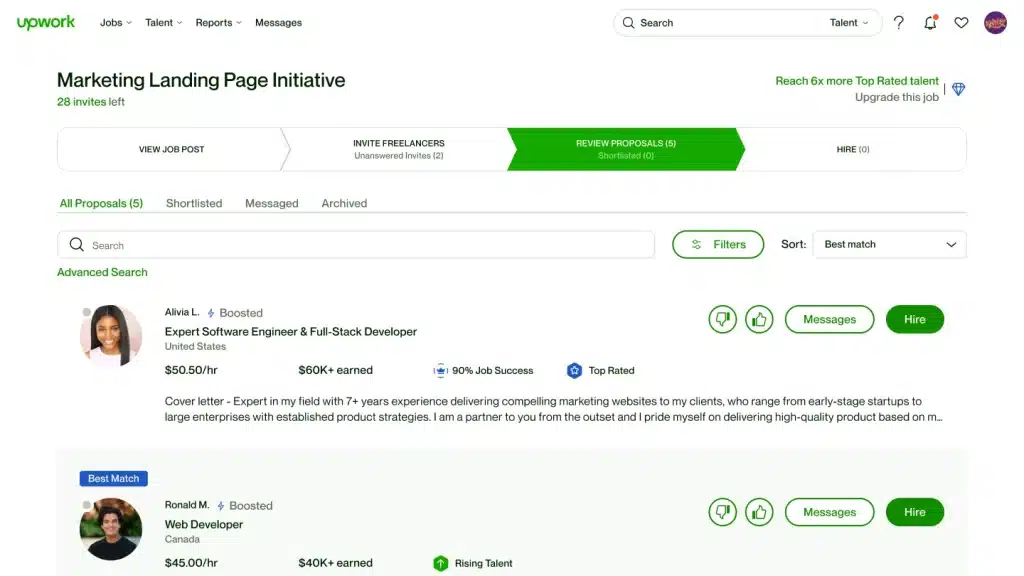
To help top talent stand out, Upwork tracks performance metrics using the Job Success Score (JSS) alongside talent badges.
+-------------------+------------------------------------------------------+
| BADGE / METRIC    | QUALIFICATION CRITERIA                               |
+-------------------+------------------------------------------------------+
| Job Success Score | Calculated metric (0-100%) reflecting client         |
| (JSS)             | satisfaction over 6, 12, and 24-month periods.       |
+-------------------+------------------------------------------------------+
| Rising Talent     | High-potential new freelancers with great profiles,  |
|                   | early project wins, and good application rates.     |
+-------------------+------------------------------------------------------+
| Top Rated         | 90%+ JSS, $1,000+ earned in 12 months, 100% complete  |
|                   | profile, and a clean account standing.               |
+-------------------+------------------------------------------------------+
| Top Rated Plus    | Meets Top Rated benchmarks PLUS completed high-value |
|                   | contracts ($10k+ single enterprise or large projects)|
+-------------------+------------------------------------------------------+
| Expert Vetted     | Hand-screened by Upwork talent managers (Top 1% of   |
|                   | global technical and creative talent).               |
+-------------------+------------------------------------------------------+
Why Talent Badges & High JSS Matter:
- Increased Search Visibility: Top Rated profiles rank significantly higher in client search queries.
- Feedback Protection Rights: Top Rated freelancers can request the removal of one negative feedback score every 3 months or 10 completed contracts.
- Exclusive Project Access: Premium enterprise clients frequently restrict project listings exclusively to Top Rated or Expert Vetted freelancers.
For additional mobile utilities and business app tools that support your remote freelancing operations, explore RedAPK Mobile Apps.
Hiring World-Class Talent on Upwork (Employer Guide)
Upwork is equally powerful for business owners, project leads, and startup founders seeking to assemble distributed teams rapidly.
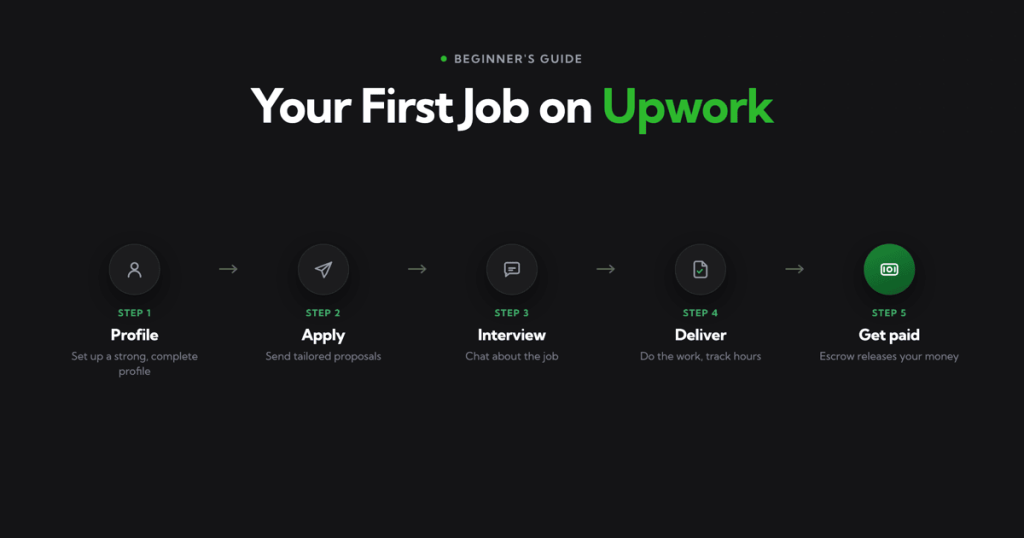
+--------------------------------------------------------------------------+
|                     EMPLOYER HIRING STEPS ON UPWORK                      |
+--------------------------------------------------------------------------+
| Step 1: Draft a Clear Job Post (Specify deliverables, scope, & budget)   |
| Step 2: Screen Applicants (Filter by JSS, portfolio quality, & history)  |
| Step 3: Interview Top Candidates (Use Upwork's integrated video call)    |
| Step 4: Issue Contract & Fund Escrow (Keep transactions on-platform)     |
| Step 5: Review Deliverables & Approve Payment (Release milestone funds)  |
+--------------------------------------------------------------------------+
Best Practices for Hiring Clients:
- Draft Detailed Scope Descriptions: Instead of asking for “An App Developer,” state “Need an Android Engineer to Integrate Stripe Payments and Fix OAuth Login Bugs.”
- Include a Friction Filter: Add a simple instruction in your job post (e.g., “Include the keyword ‘Agile’ in your first sentence”) to quickly identify automated applications.
- Review Client Feedback History: Read past freelancer feedback on applicant profiles to evaluate communication style, reliability, and technical consistency.
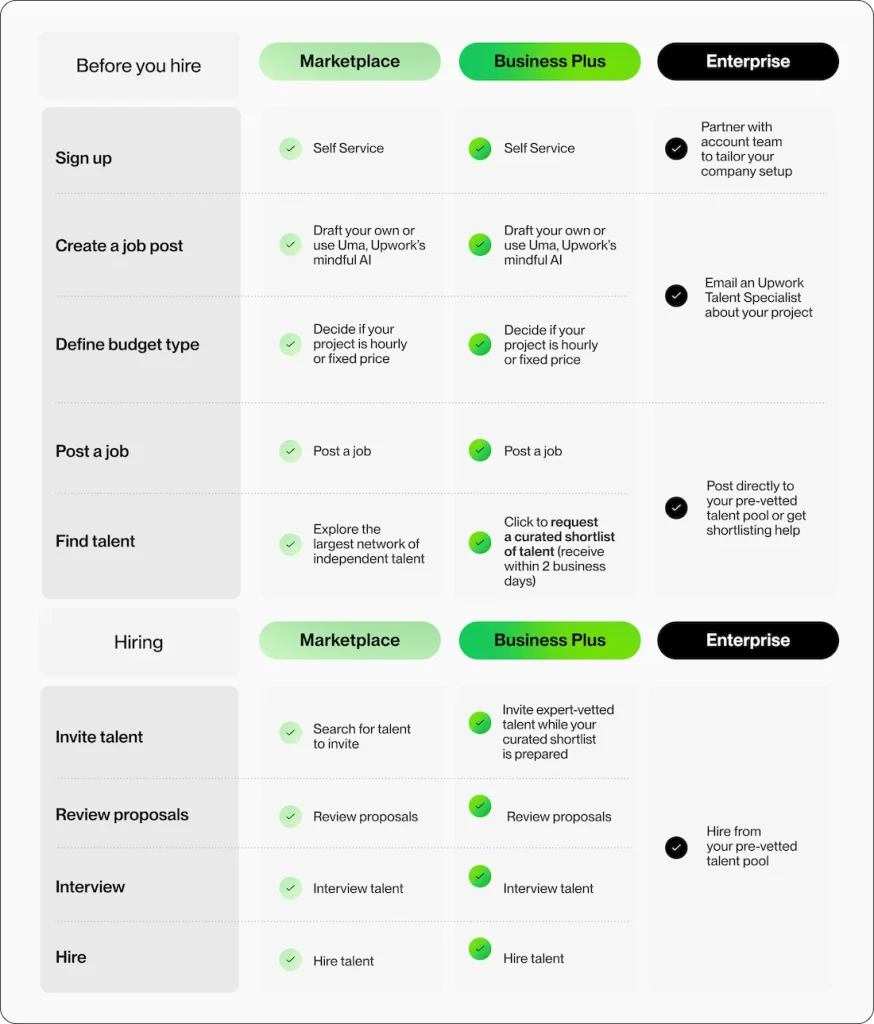
- Leverage Upwork Enterprise for Large Organizations: Enterprise accounts provide custom compliance support, dedicated sourcing managers, and single-invoice billing.
Recruit top talent today by visiting Hire Top Freelancers on Upwork.
Upwork Financials: Fee Structure & Secure Withdrawal Methods
Upwork provides secure financial processing, clear fee structures, and reliable global withdrawal channels.
The Upwork Flat Fee Model
Upwork implements a straightforward 10% flat service fee across all freelancer earnings.
For example, if you complete a project billed at $1,500, Upwork’s platform fee is $150, leaving you with $1,350 in net earnings.
+--------------------------------------------------------------------------+
|                         AVAILABLE WITHDRAWAL METHODS                     |
+--------------------------------------------------------------------------+
| Direct Local Bank Transfer (Local currency payout, low transaction fees)  |
| Payoneer (Fast USD transfers to Payoneer card or local bank account)     |
| PayPal (Instant digital wallet transfer)                                 |
| Wire Transfer ($50 USD fee per wire transfer, ideal for large payouts)   |
| Direct to U.S. Bank (ACH) (Free transfers for U.S. bank account holders) |
+--------------------------------------------------------------------------+
Top High-Paying In-Demand Freelance Skills for 2026
Demand for specialized digital services continues to increase. Here are the fastest-growing skill categories commanding premium rates on Upwork:
1. Artificial Intelligence & Machine Learning
- Prompt engineering, LLM integration, OpenAI API deployment, LangChain architecture, and custom AI agent automation.
2. Full-Stack Web & Mobile Engineering
- Next.js, React.js, Node.js, Python/Django, Flutter cross-platform development, and cloud management (AWS, Azure, GCP).
3. UI/UX & Product Design
- Figma design systems, mobile application UI design, user journey mapping, and interactive prototyping.
4. Digital Growth & Performance Marketing
- Paid acquisition (Google/Meta ads), technical SEO, conversion rate optimization (CRO), and lifecycle email automation.
5. Technical Writing & Strategic Copywriting
- Developer documentation, SEO content strategy, video scriptwriting, and high-converting landing page copy.
For freelancers working in development, design, or content creation who want verified software mirrors on Android, explore RedAPK Productivity Software.
Essential Mobile Utilities & Android App Ecosystem
Managing a remote freelance career requires maintaining fast communication and managing work progress from anywhere. Having reliable mobile apps installed ensures you stay responsive to client inquiries.
+--------------------------------------------------------------------------+
|                     MOBILE FREELANCER APP CHECKLIST                      |
+--------------------------------------------------------------------------+
| Upwork Freelancer App : Instant job alerts, client chat, proposal status |
| Upwork Desktop App    : Automated time tracking, work diary, memos       |
| Communication Tools   : Zoom, Slack, Microsoft Teams, Telegram           |
| File Management       : Figma Mobile, Google Drive, Dropbox, Notion      |
| Financial Tools       : Payoneer App, PayPal, QuickBooks, Wave           |
+--------------------------------------------------------------------------+
To ensure your Android smartphone is equipped with verified productivity apps, utility tools, and business applications, check out RedAPK Download Hub.
Scaling Beyond Solo Freelancing: Building an Upwork Agency
When your personal schedule is fully booked and your hourly rates reach top market tiers, the logical next step is scaling your operations by forming an Upwork Agency.
+--------------------------------------------------------------------------+
|                     SOLO FREELANCER VS. UPWORK AGENCY                    |
+--------------------------------------------------------------------------+
| Solo Freelancer  : Trades personal time for income (Capped growth capacity)|
| Upwork Agency    : Coordinates a team of sub-freelancers under 1 brand |
+--------------------------------------------------------------------------+
Steps to Launch an Upwork Agency:
- Set Up an Agency Profile:
Create an Agency Profile linked directly to your existing account inside settings. - Bring On Specialist Team Members:
Add junior developers, designers, writers, or virtual assistants to your agency roster. - Pitch Large Turnkey Projects:
Submit agency proposals for comprehensive project scopes. The client contracts your agency, and you assign team members to handle execution while managing client relationships and quality assurance. - Increase Total Contract Volumes:
Agencies can comfortably bid on enterprise contracts (e.g., $30,000 full-scale software builds) that solo practitioners cannot manage alone.
Scale your business by visiting Upwork Enterprise Portal.
Why RedAPK.net is an Essential Tool Resource for Digital Workers
When managing a digital freelance career, accessing safe software applications for your mobile devices is critical.
RedAPK serves as a trusted software platform offering:
- Virus-Tested APK Files: All application files hosted on www.redapk.net are thoroughly scanned for malware and security vulnerabilities.
- Direct Server Downloads: Download software mirrors quickly without ad pop-ups or broken links.
- Curated Business Applications: Discover time trackers, communication apps, document readers, and productivity tools.
Be sure to keep RedAPK Android Directory bookmarked for safe access to mobile app releases.
Account Protection, Platform Rules & Compliance Safety
To keep your account in good standing, adhere strictly to Upwork’s Terms of Service:
1. Conduct All Communications & Payments On-Platform
Never accept off-platform payments for clients met through Upwork. Doing so violates platform terms and forfeits your Hourly and Escrow Payment Protections.
2. Never Pay Fees to Apply for Jobs (Outside Connects)
Clients are strictly forbidden from demanding upfront registration fees, security deposits, or requiring hardware purchases from unverified vendors.
3. Maintain Fast, Professional Response Rates
Always respond to client messages within 24 hours. Prompt communication is one of the most significant factors in earning 5-star private feedback and keeping a 90%+ JSS.
Technical Troubleshooting & Comprehensive FAQ
Here are solutions to common questions asked by freelancers and clients using Upwork:
Frequently Asked Questions (FAQs)
Q1: Is joining Upwork completely free?
Yes! Registering a freelancer or client profile costs nothing. New freelancers receive a complimentary package of Connects upon profile approval, with options to buy additional Connects as needed. Register via Create Your Upwork Account.
Q2: How fast do funds become available after contract completion?
For hourly contracts, billing cycles run Monday through Sunday. Logged hours enter a 5-day security hold before becoming available for withdrawal the following Wednesday. For fixed-price contracts, escrow funds become available as soon as the client approves a milestone.
Q3: Can I run my freelance business using only a mobile phone?
While you can browse opportunities, communicate with clients, and submit proposals using the Upwork mobile app, tracking hourly contracts requires the desktop app. Complex coding, design, and writing tasks generally require a computer.
Q4: How can I recover from a drop in my Job Success Score (JSS)?
Complete active open contracts successfully, deliver outstanding work to current clients to earn 5-star private feedback, and close old inactive contracts that may be pulling down your average.
Q5: Where can I find safe Android productivity and utility apps?
You can download verified business tools and utility apps from RedAPK Official Site.
Conclusion & Strategic Action Plan
Upwork is far more than a simple job board—it is an engine for career freedom, international reach, and business growth. By offering reliable payment protections, direct access to premium global clients, versatile contract models, and agency scaling paths, Upwork provides everything required to build a high-earning remote career.
Whether your goal is to earn extra income freelancing on weekends or to build a multi-person global consulting firm, long-term success comes down to profile positioning, proposal quality, and delivering outstanding work.
Ready to take your professional career to the next level?
🚀 Click Here to Sign Up on Upwork and Start Winning Global Clients Today!
For more technology guides, mobile productivity tools, and software downloads, be sure to visit RedAPK Tech Store!
Disclaimer: Remote freelancing requires dedication, ongoing skill development, and strong client management. Success on Upwork depends on profile quality, proposal strategy, and work execution. Please review Upwork’s official Terms of Service to ensure full compliance.