
Introduction

In today’s fast-growing Android ecosystem, millions of apps are available on the Google Play Store — the official marketplace for Android users. However, many people choose to install apps from other sources, often referred to as “sideloading” APKs. The big question that always comes up is: Is it really safe to install apps outside the Play Store?
Let’s explore the pros, cons, and safety measures to help you make smart decisions.
Table of Contents
1. What Does “Installing Apps Outside the Play Store” Mean?
Android gives users freedom that iOS doesn’t — the ability to install applications from third-party sources. This process is known as sideloading.
When you download an app’s installation file, usually ending with “.apk” or “.aab,” from a website and install it manually, that’s sideloading.
Popular reasons for doing this include:
- Accessing apps not available in your region
- Downloading older versions of apps
- Testing beta versions before official release
- Accessing apps removed from Play Store for non-security reasons
While it sounds convenient, it also carries some serious risks if not done carefully.

2. Why Do Some People Choose Third-Party APKs?
There are many legitimate reasons users go beyond the Play Store.
- Regional restrictions: Some apps are launched first in specific countries, leaving others waiting for months.
- Older versions: Updates sometimes remove features people liked, so they prefer older versions.
- App testing: Developers or tech enthusiasts test beta versions before they’re available officially.
- Play Store issues: Occasionally, Google Play blocks apps due to policy differences, even when they’re safe.
In short, downloading APKs outside the Play Store isn’t always about piracy — it’s often about accessibility and flexibility.
3. The Security Risks You Should Know
Despite the benefits, sideloading apps does come with real dangers.
- Malware and viruses: Not all websites verify APK safety. Malicious apps can steal data, track you, or damage your device.
- Data theft: Some fake apps mimic real ones and capture personal information like passwords or banking data.
- No automatic updates: Apps installed outside Play Store don’t update automatically. You must manually check for new, safe versions.
- No Play Protect scanning: Play Store uses Google Play Protect to scan apps for harmful behavior — sideloaded apps skip that layer of defense.
So while installing an APK may be quick, you must be cautious.
4. How to Check If an APK File Is Safe
Before installing any app from outside the Play Store, here are essential safety checks you should perform:
a. Download only from trusted websites.
Use well-known platforms that verify APK signatures, like:
- APKMirror
- F-Droid (for open-source apps)
- Official developer websites
b. Verify the app’s publisher and signature.
Always cross-check the developer’s name with the one listed on the Play Store. Genuine APK repositories provide cryptographic signatures to confirm authenticity.
c. Scan APKs for malware.
You can upload APK files to free scanners like VirusTotal.com, which checks the file across multiple antivirus databases.
d. Check app permissions.
Before installing, see what permissions the app requests. If a photo editor wants access to contacts or SMS, that’s a red flag.
5. Use Tools and Settings for Safer Sideloading
Android allows you to control sideloading permissions smartly:
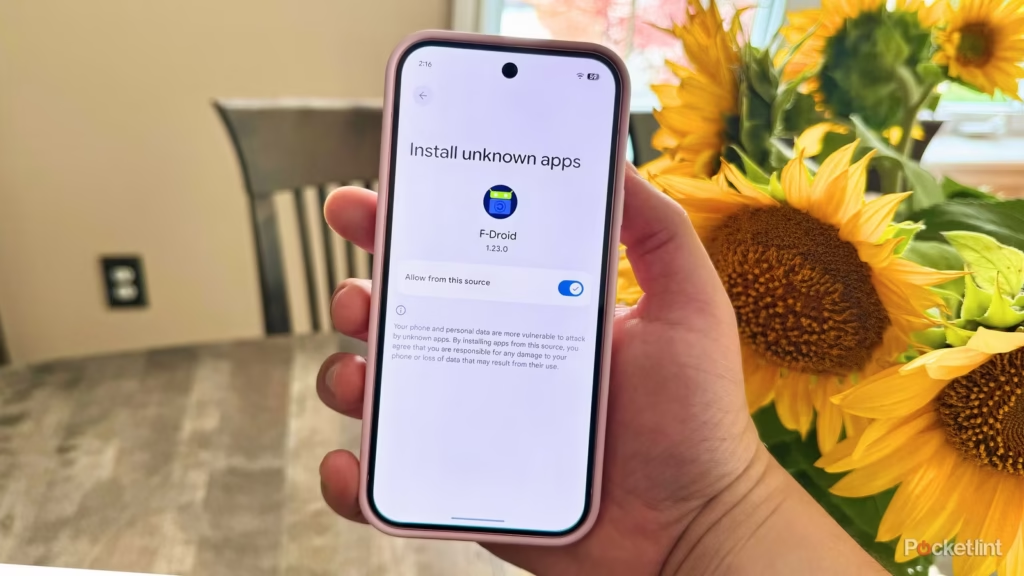
- Enable “Install unknown apps” only for trusted sources (like your file manager or browser).
- Disable it again after installation.
- Use Play Protect or another mobile security app to scan regularly.
- Keep your phone’s OS updated to patch vulnerabilities.
If you’re using Android 13 or above, you can also manage “Install Sources” in Settings for better control.
6. Legal Perspective: Is It Allowed?
Yes, sideloading is completely legal on Android. Google gives you that flexibility.
However, downloading paid apps for free or using modified APKs (like hacked versions) is illegal and can lead to account bans or device security issues.
Always stick to legitimate and verified APK providers.
7. When Should You Avoid Sideloading?
Avoid installing APKs from:
- Random Telegram or WhatsApp groups
- Unverified websites offering “mod” or “cracked” versions
- Sites that ask for personal information before download
If something feels suspicious, it probably is.
8. The Smart Way Forward
If you often install apps outside the Play Store, build a routine safety habit:
- Download only from reputable APK repositories
- Always verify developer signatures
- Use antivirus or Play Protect scans
- Avoid sharing your APKs through unknown sources
- Update manually from the same trusted site
9. Final Thoughts
Installing Android apps outside the Play Store isn’t necessarily unsafe — it’s all about where and how you do it. Trusted sources like APKMirror and F-Droid are transparent about app signatures and security.
However, careless sideloading from random websites can expose you to malware, privacy risks, and data theft.
If you treat your device like your digital wallet — cautious, informed, and aware — you can safely enjoy the flexibility Android offers without risking your privacy or security.