
Introduction
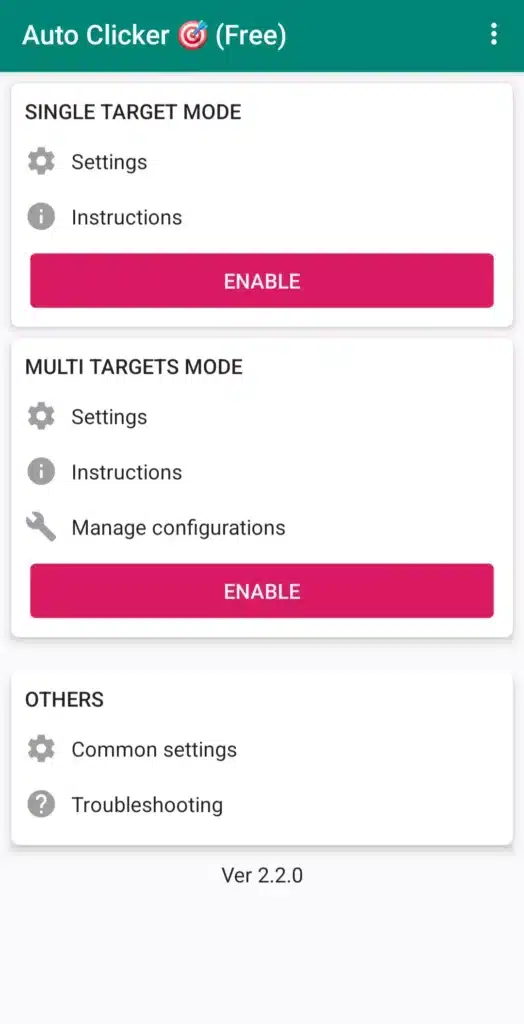
In a world where mobile apps and games often require repeated taps, swipes, or clicks, performing these actions manually can be tedious and time-consuming. This is where Auto Clicker – Automatic Tap comes in. The app automates screen taps and swipes according to your settings—saving time, effort, and reducing fatigue.
Whether you need to grind in a game, automate repetitive tasks, or simply tap repeatedly without manual input, Auto Clicker 2.3.0 offers a complete solution. Android users who want to streamline certain tasks will find this app especially useful, as it works without root, supports multiple click points, swipe gestures, and saved profiles for repeated use.
In this guide, you’ll learn what Auto Clicker does, its key features, how to install it, use cases, and important considerations.
Table of Contents
What is Auto Clicker – Automatic Tap?
Auto Clicker – Automatic Tap version 2.3.0 is an Android utility that lets you automate taps, swipes, or clicks on your screen with customizable intervals, durations, and patterns. (APKMirror)
Key points about the app:
- Works without root access. (APKMirror)
- Supports single-point taps as well as multi-point taps/swipes. (Auto Clicker on Download.it)
- Fully customizable intervals, durations, repeat counts, and loops. (Auto Clicker on Download.it)
- Provides a floating control panel for start/stop automation without opening the main interface. (APKPure)
- Allows saving and reusing configurations for repeated tasks. (APKMirror)
- Compatible with Android 7.0 and above. (APKPure)
Key Features of Auto Clicker – Automatic Tap 2.3.0
✅ No Root Required & Easy to Use
Many automation tools require root access or complicated setups, but Auto Clicker 2.3.0 works out-of-the-box on modern Android devices. Its user interface is intuitive, and the floating panel allows you to start or stop automation with ease. (APKMirror)
🎯 Single Point & Multi Point Modes
- Single Point Mode: Automate taps at a single location—perfect for games or apps with repetitive button presses. (Auto Clicker on Download.it)
- Multi Point Mode: Set multiple tap or swipe points, define order, intervals, and durations for more complex automation. (Auto Clicker on Download.it)
⏱️ Precise Timing Control & Macro Support
You can adjust intervals down to milliseconds, choose tap types (single/double/triple), and set delays between actions. Auto Clicker 2.3.0 supports saving configurations or scripts for recurring tasks. (APKMirror)
🔄 Swipes, Scrolls, and Taps
Beyond taps, Auto Clicker 2.3.0 supports swipe gestures and scrolls, enabling automation for menu navigation or multi-step tasks. (Auto Clicker on Download.it)
🧰 Versatile Use Cases
Common scenarios for Auto Clicker 2.3.0 include:
- Gaming: Automate repetitive tapping in idle games, resource farming, or click-based challenges.
- Routine Tasks: Automate repetitive actions like form submissions or menu navigation.
- Testing & QA: Simulate repeated user interactions for UI testing.
- Productivity: Save time by automating frequent taps or swipes.
How to Download and Install Auto Clicker – Automatic Tap 2.3.0
Since Auto Clicker may not be available in all regions on Google Play, follow these steps:
- Visit a trusted APK repository. (APKMirror)
- Ensure your device runs Android 7.0 or higher.
- Download the Auto Clicker 2.3.0 APK file. (APKMirror)
- Enable installation from “unknown sources” if prompted.
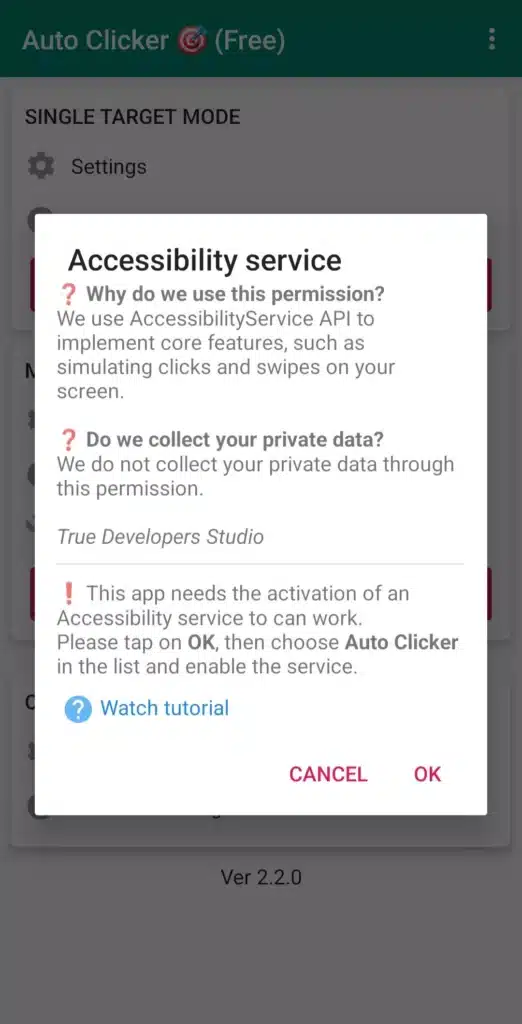
- Install the APK and grant accessibility permissions for automation.
- Launch the app, configure tap points or gestures, and start the service using the floating panel.
Note: Always download APKs from trusted sources to avoid malware or unauthorized modifications.
Pros and Cons
👍 Pros
- Eliminates repetitive tapping tasks.
- No root access required.
- Flexible configuration with single/multi-point taps, swipes, and macros.
- Lightweight and efficient.
- Useful for games, productivity, and testing.
⚠️ Cons
- May conflict with apps or games that detect automation. (Auto Clicker on Updatestar)
- Complex multi-point setups may occasionally freeze.
- Free versions may contain ads or limited features. (Auto Clicker on Download.it)
- Accessibility permissions may concern some users.
- Using in apps that forbid automation may violate their terms.
Who Should Use Auto Clicker 2.3.0?
Ideal for:
- Mobile gamers needing repeated taps or swipes.
- Users automating routine tasks.
- App developers or testers.
- Anyone seeking to save time on repetitive Android actions.
Caution: Always respect app/game rules to avoid penalties.
Safety and Legality
Auto Clicker 2.3.0 only uses accessibility permissions for taps/swipes. It does not require root and generally does not collect sensitive data. (APKMirror)
Considerations:
- Safe for personal productivity tasks.
- Using in apps or games that forbid automation may violate terms.
- Download from reputable sources only.
Step-by-Step Usage Guide
- Install APK (Android 7.0+).
- Grant accessibility permissions.
- Use the floating panel to add tap points.
- Choose single or multi-point mode.
- Configure intervals, duration, and repeats.
- Save scripts/profiles if desired.
- Start automation and switch to the target app.
- Monitor or stop using the floating panel.
Download Links
- Official APKMirror link (v2.3.0): Download Here
- Alternative Download.it link: Download Here
- Check RedAPK for additional versions or related apps.
Conclusion
Auto Clicker – Automatic Tap 2.3.0 is a versatile, user-friendly, and lightweight tool for automating taps, swipes, and repetitive actions on Android. With flexible timing, multi-point support, and macros, it’s ideal for gaming, productivity, and testing.
Use responsibly, download from trusted sources, and respect app/game rules to maximize safety and efficiency. Auto Clicker 2.3.0 can save significant time and effort while handling tedious repetitive tasks effortlessly.