
Best AI Productivity Tools for Freelancers in 2026: Work Smarter, Earn More
Struggling to keep up with client emails, first drafts, and endless research every week?
You’re not alone — and you’re likely losing valuable billable hours to it. In 2026, AI productivity tools for freelancers aren’t just a nice-to-have anymore; they’re a genuine competitive edge separating top earners from the rest. Upwork’s Future Workforce Index 2026 found that freelancers who incorporate
AI into their work earn 34% more per hour than those who don’t.
That’s not a marginal gain — it’s proof that freelancers using AI strategically aren’t just completing tasks faster, they’re commanding higher rates for the value they deliver.
If you want to stay competitive (and get paid what you’re worth), here are the best AI tools freelancers are using to reclaim their time in 2026 Upwork’s Future Workforce Index 2026,

Table of Contents
Why AI Productivity Tools for Freelancers Matter More in 2026
The math is simple. Bill $50–100 an hour, and even 5–10 hours saved each week turns into real extra capacity. That capacity becomes more clients, or simply more free time.
Clients notice the difference, too. A faster turnaround and a cleaner deliverable are increasingly what separates a freelancer worth rehiring from one who isn’t.
So the freelancers who struggle in 2026 usually aren’t avoiding AI altogether. Instead, they’re chasing every new tool without ever building a system that actually sticks.
The Core Categories of AI Productivity Tools for Freelancers
Before picking any tools, it helps to know exactly what you’re solving for. Most freelance work breaks down into a handful of repeatable categories:
- Writing & reasoning — proposals, emails, reports, long-form content
- Research — verifying facts, gathering sources, competitive research
- Proofreading & polishing—catching errors before a client ever sees them
- Design & visuals — images, mockups, social graphics
- Scheduling & admin — calendars, invoicing, repetitive coordination
- Meeting notes — transcription and summaries, so you’re not typing while you talk
Once you know which categories eat the most time, choosing tools gets much easier.
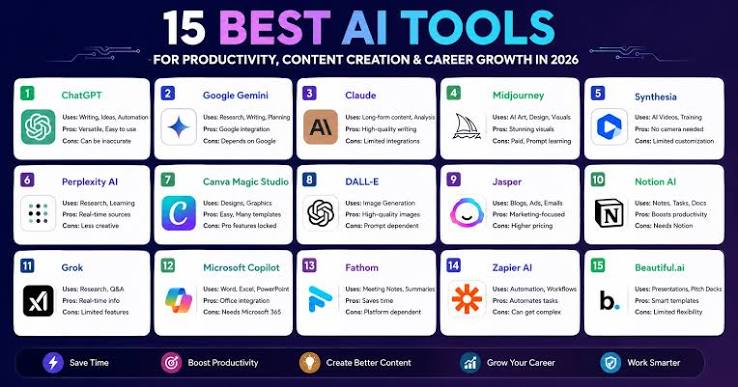
Best AI Productivity Tools for Freelancers by Task
For writing and client communication: A general-purpose AI assistant like Claude or ChatGPT covers most of this ground.
Claude tends to stand out for longer documents and nuanced editing, for example, while ChatGPT works well as an all-around option for drafting and brainstorming.

For research: A dedicated research tool like Perplexity is worth pairing with your main assistant.
Because it cites live sources, it pulls current information instead of relying only on training data.
For proofreading: A grammar and clarity tool still outperforms general AI assistants for a final pass. Grammarly remains the most established option here.
For coding: Freelance developers save real time with AI coding assistants like GitHub Copilot.
It speeds up boilerplate and repetitive code, although the review step still matters.
For design and visuals: AI image tools like Midjourney or Canva’s AI features are the go-to choice for social graphics and mockups.
As a result, many freelancers no longer need to hire a designer for every small task.
For automation and admin: Automation platforms like n8n or Make quietly handle repetitive admin work.
For instance, they can move new leads into a CRM or send follow-up emails without you touching it manually.
For meeting notes: AI note-takers like Fathom or Granola record and summarize client calls automatically.
That way, you stay present in the conversation instead of scrambling to type.
How to Build Your Own AI Productivity Stack
You don’t need every tool on this list. Instead, start small:
- Map your week. Write down where your time actually goes for a few days.
- Pick one tool per bottleneck, not five tools for the same job.
- Give each tool two real weeks before deciding if it earns its place.
- Review your stack monthly, and cut anything you’re not using consistently.
Internal link placeholder—once you’ve published a related post, link it here, e.g., “See our guide on structuring a freelance workflow around AI for a deeper walkthrough.”
Common Mistakes Freelancers Make With AI Productivity Tools
- Tool-hopping — chasing the newest app instead of mastering one that already works
- Skipping the review step — sending AI output to a client without a human pass
- Losing your voice — over-relying on AI drafts until your writing sounds generic
- Subscription bloat — paying for five overlapping tools instead of one solid stack
Avoiding these four mistakes matters more than adding another tool to your stack.
Grok APK Version 1.1.09: The Frontier of Mobile AI

The release of Grok APK Version 1.1.09-release.00 marks a pivotal moment in the expansion of xAI’s ecosystem.
Moving beyond the confines of the X social media platform, this standalone Android application delivers a direct conduit to the world’s most advanced reasoning models.
Designed to be “maximally truthful” and possessing a unique, curious personality, Grok 1.1.09 is built for users who demand real-time data and uncensored insights.
FAQ: AI Productivity Tools for Freelancers
What’s the single best AI productivity tool for freelancers?
There isn’t one universal answer. It depends on your work — writers and consultants get the most from a strong writing assistant like Claude, while developers see bigger gains from coding-specific tools like Copilot.
Do freelancers need multiple AI tools, or is one enough?
One general-purpose assistant covers a lot. That said, most freelancers eventually add one or two specialized tools, usually for research, proofreading, or their specific craft.
Is it safe to use AI tools on client work?
Generally, yes — especially with tools that offer business or professional tiers with stronger data protections.
Even so, always review AI output before sending it, and disclose AI use if a client’s contract requires it.
Will AI replace freelancers?
Not based on the data so far. Demand for human-delivered skills has stayed strong even as AI adoption rises, and freelancers using AI well are simply outcompeting freelancers who avoid it entirely.

Final Thoughts
The freelancers pulling ahead in 2026 aren’t the ones with the biggest tool collection.
They’re the ones who built a small, dependable AI productivity stack and stuck with it.
Start with one tool for your biggest time sink this week, and build from there.

What’s the one AI tool you couldn’t run your freelance business without? Share it in the comments.
Tags
ai productivity tools, ai tools for freelancers, freelance productivity, ai for freelancers, productivity apps, remote work productivity, freelance business tips, work smarter, ai workflow 2026
Social Media Hashtags
#AIProductivityTools #FreelanceLife #AIForFreelancers #ProductivityHacks #WorkSmarter #FreelanceTips #RemoteWork #AITools #DigitalNomad #SoloPreneur #FreelanceBusiness #ProductivityTips #AIWorkflow #FutureOfWork #WorkFromAnywhere